An illustrative scenario (not a case study): a team ships a detection model to a few hundred cameras across several sites. It passes every test. Three months later, the supervisors stop trusting the alerts. Nobody changed the model. The seasons changed, a site repainted its walls, and a few cameras were re-aimed during maintenance.
Nothing in the original project plan covered what happens next. Who notices the decay? How does a fixed model reach devices that are offline half the day? What if the update makes things worse?
That gap is what edge MLOps exists to close. This guide explains what it is, how it differs from cloud MLOps, and how to run edge deployment as an ongoing operation instead of a one-time install. It is written for engineering, operations and IT leaders in the United States who are evaluating, building or buying edge AI.
Where to start, depending on your role
| If you are... | Start with | Then use |
|---|---|---|
| An ML or embedded engineer building the system | Architecture, Steps 3 to 6, drift detection in depth | Release gates and the diagnostic table |
| An operations or safety lead who owns the outcome | Edge MLOps vs cloud MLOps, monitoring, the readiness checklist | The maturity model and the 30-60-90 plan |
| A buyer or procurement lead comparing vendors | The buyer scorecard and US governance questions | Vendor questions and common mistakes |
What Is Edge MLOps?
Edge MLOps is the practice of automating and managing the machine learning lifecycle (data, training, deployment, monitoring and retraining) for models that run on edge devices instead of in a data center. It applies the same ideas as MLOps, with extra attention to hardware limits, unreliable connectivity and fleets that are physically scattered.
Edge Impulse’s documentation describes edge MLOps as resting on three principles: version control, automation and governance. Those three words are a useful filter for the rest of this guide. If a deployment plan cannot answer "what version is running where," "what happens automatically," and "who approved this," it is not an MLOps plan yet.
Edge MLOps vs Cloud MLOps
Cloud MLOps assumes you can redeploy a container and watch it come up. Edge MLOps cannot assume that. InTechHouse’s guide to updating and managing ML models on deployed devices puts the core problem well: devices in the field are distributed, often disconnected, and can’t be updated the way a cloud service can.
| Cloud MLOps | Edge MLOps | |
|---|---|---|
| How updates ship | Redeploy a container or service | Over-the-air (OTA) delivery, staged by cohort |
| Connectivity | Assumed stable | Intermittent or offline for long stretches |
| Hardware | Uniform, easy to scale | Mixed devices, tight memory, power and thermal limits |
| What you monitor | Server health and service metrics | Model behavior, input quality, device health |
| Failure cost | Roll back a service | A bad push can strand devices you can’t easily reach |
| Security surface | Servers and APIs | Devices, firmware, model files, local networks |
The practical consequence: designing for always-on inference and only occasional connectivity for everything else is the central engineering problem of edge MLOps.
The Edge AI Lifecycle: Where Edge MLOps Starts and Stops
The lifecycle has seven steps: collect data, clean it, extract features, train, test, deploy and maintain. Edge MLOps does not replace these. It automates and connects them so a change in the field can travel back to training and forward to devices without a person hand-carrying files.
The rest of this guide follows the steps that most teams underbuild: optimize, package, deploy, update, monitor and close the loop.
What Does an Edge MLOps Architecture Look Like?
A production edge MLOps system has five planes: device runtime, device agent, control plane, training and registry, and observability. Most failed projects are missing one of them, usually the control plane or the observability plane.
| Plane | Its job | Typical components | What breaks without it |
|---|---|---|---|
| Device runtime | Runs inference and local safeguards | Optimized model, inference runtime, preprocessing, local rules, watchdog | Inference stalls or crashes with no recovery |
| Device agent | Talks to the control plane | Update client, signature verification, health reporting, local buffer | Devices can’t receive or confirm a release |
| Control plane | Decides what runs where | Device inventory, release manager, cohorts, approvals, rollout policy | Nobody knows which version runs on which device |
| Training and registry | Produces and stores releases | Data pipeline, training jobs, evaluation, model registry, artifact signing | Releases can’t be reproduced or audited |
| Observability | Turns field behavior into signals | Telemetry ingest, drift analysis, alert outcomes, sampled-data review | Decay stays invisible until users complain |
One release travels through the planes in this order:
- The training plane builds and evaluates a candidate, then signs and registers it.
- The control plane picks a cohort and issues a release manifest.
- The device agent downloads the package and verifies its signature and compatibility.
- The device runtime loads the model in a trial slot, without discarding the previous one.
- The device decides locally whether the trial passed its health checks, and commits or reverts.
- The observability plane compares the cohort against the baseline.
- The control plane promotes the release to the next cohort, or pauses it.
A Release reaches the full fleet only after each stage passes.
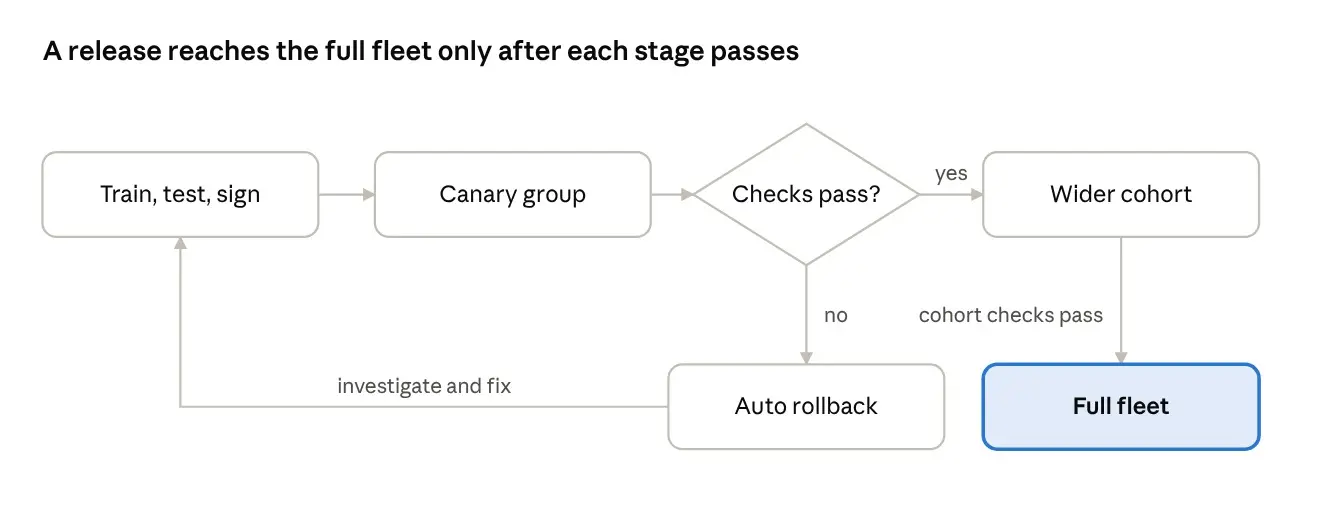
A failed check at any stage sends the release back for investigation, and the devices return to the last good model.
Design rule: keep the commit-or-revert decision on the device. A device that must ask the cloud for permission to roll back is a device that stays broken when the connection drops. Traceability matters just as much. In Red Hat’s FlightCtl-based MLOps example, every artifact is tagged with the commit SHA, which lets a team trace any running device back to the exact build behind it.
Step 1: Optimize the Model for the Hardware
A model that works on a workstation GPU often cannot run on the device that will actually sit in the field. Optimization is how you close that gap, and it belongs inside the pipeline, not as a one-off task.
Two rules keep this step honest. First, re-measure accuracy after every optimization, on data that resembles the field. Second, record which optimized build runs on which hardware, because a model that is correct on one accelerator can behave differently on another.
If you want to see how this step fits into a complete on-site stack, RootBlock Labs covers model optimization and ongoing edge MLOps for on-site Edge AI as part of its Edge AI work.
| Technique | What it does | Main trade-off |
|---|---|---|
| Quantization (for example FP32 to FP16 or INT8) | Stores weights at lower precision | Possible accuracy loss; must be re-validated |
| Pruning | Removes weights that contribute little | Needs retraining or fine-tuning afterward |
| Compilation for a target runtime (ONNX Runtime, TensorRT, OpenVINO) | Optimizes execution for specific hardware | Ties the artifact to a hardware family |
Step 2: Package and Version Everything Together
A deployed "model" is really three things: the model weights, the configuration (thresholds, class lists, input settings) and the runtime that executes them. This fleet-deployment playbook for edge AI provisioning and OTA updates from GPU Mart recommends versioning models, configs and runtimes independently. That detail prevents a common failure: changing a threshold in config and accidentally changing behavior on devices that were never meant to receive it.
A minimum viable registry entry answers:
- Which model version, config version and runtime version make up this release?
- Which dataset and training run produced it?
- Which hardware has it been validated on?
- Who approved it, and when?
- What is the last known good release to roll back to?
Step 3: Edge Deployment in Stages
Edge deployment is the act of getting an optimized, versioned model onto devices at the site and confirming it behaves correctly there. Do it in stages, never all at once.
- Canary: a small group of devices (ideally varied by site, camera angle or hardware).
- Cohort: a larger group, once the canary meets your acceptance criteria.
- Fleet: everyone else, with the ability to pause.
Here is an illustrative rollout policy. The syntax is generic and not tied to any specific product:
release: detector-v2.4
stages:
- name: canary
  devices: 2% of fleet, at least one per site
  hold: 72 hours
  proceed_if:
  - no crash or reboot loops
  - precision and recall within agreed bounds on sampled review
  - inference latency within budget
- name: cohort
  devices: 25% of fleet
  hold: 7 days
- name: fleet
  devices: remaining
rollback:
  automatic_if: error rate or latency breaches threshold
  target: last known good release
The numbers belong to you. The structure is the point: each stage has a hold period, explicit pass criteria and a rollback target. Canary and blue-green approaches differ mainly in how traffic or devices are switched, but on constrained devices a canary by cohort is usually the more practical pattern.
Step 4: OTA Model Updates Without Bricking the Fleet
OTA is where edge MLOps projects most often get hurt. A good OTA process, as described in InTechHouse’s edge MLOps guide on OTA updates and rollback, includes delta-based updates to save bandwidth, signed and validated packages before activation, and automatic rollback if an update underperforms.
Use this checklist before enabling OTA for models:
- Integrity: every package is signed, and devices verify it before activating.
- Atomic swap: the new model is staged beside the old one and switched only after validation passes.
- Rollback: the device keeps the previous model and can revert on its own, even offline.
- Resume: interrupted downloads resume instead of restarting or corrupting state.
- Offline behavior: devices that miss an update window keep working on the old model and catch up later.
- Delivery tooling: use a device-management layer built for this. For example, a Hackster walkthrough shows a Linux edge device receiving versioned model releases through Golioth’s OTA service (source).
The same discipline applies to firmware and to the model. Treat them as one release train, so a model update never lands on firmware that cannot run it.
How Do You Roll Back a Bad Model on a Device That Is Offline?
Keep the previous model in a second slot, run the new one on trial, and let the device commit only after local health checks pass for a defined window. If the checks fail, the device reverts on its own without contacting the cloud.
This pseudocode is illustrative and not tied to any product:
on_new_release(release):
  verify_signature(release)      # reject unsigned or expired manifests
  verify_compatibility(release)  # runtime, firmware, hardware ID
  stage(release, slot="B")       # slot A still holds the last good model
  activate(slot="B", mode="trial")
  start_commit_window(min_inferences=N, max_duration=T)
  during_commit_window():
    if crash or watchdog_reset:  revert(slot="A"); report("reverted: crash")
    if p95_latency > budget:     revert(slot="A"); report("reverted: latency")
    if confidence_collapse():    revert(slot="A"); report("reverted: confidence")
  if window_complete and all_checks_pass:
    commit(slot="B"); report("committed")
Set N and T from your own traffic. A device that sees few events per day needs a longer window than one that sees thousands.
What Is Shadow Mode, and When Should You Use It?
Shadow mode runs the new model next to the current one on real inputs, logs both outputs, and acts only on the current model. It is the safest way to test a candidate on live data, and it is often called a champion-challenger setup.
Use it when a wrong alert is expensive, when rare events make lab testing unreliable, or when the hardware is new. It costs compute, so check headroom first.
| What to compare in shadow mode | Why it matters |
|---|---|
| Agreement rate between champion and challenger | A sudden gap signals a behavior change worth reviewing |
| Reviewed disagreements | Shows whether the challenger is right or wrong where they differ |
| Added latency and memory | Confirms the device can run both without throttling |
| Temperature under dual load | Catches thermal limits before they affect the live model |
| Behavior by site, camera or time of day | A model can improve overall and still get worse somewhere |
How Do You Keep Models, Runtimes and Hardware Compatible?
Maintain a compatibility matrix and let the control plane block any release that has not been validated for the target. A model is only correct for the runtime and hardware it was tested on.
| Model | Runtime | Firmware | Hardware | Status |
|---|---|---|---|---|
| detector-v2.4 | Runtime 1.8 | FW 3.2 | Accelerator A | Validated |
| detector-v2.4 | Runtime 1.8 | FW 3.2 | Accelerator B | Not validated: blocked |
| detector-v2.3 | Runtime 1.7 | FW 3.1 | Accelerator A | Validated (rollback target) |
The entries above are placeholders to show the structure.
How Do You Stop an Old Model From Being Pushed Back?
An attacker, or a mistaken script, can replay an older signed release that has a known weakness. Counter this with signed manifests that carry an expiry time and a monotonically increasing version counter, so the device refuses anything older than its committed version. Keep a deliberate, authenticated path for planned downgrades, since you will sometimes need them.
Step 5: Monitor the Model, Not Just the Box
Standard telemetry tells you if the hardware is alive. It does not tell you if the model is still right. The GPU Mart playbook makes the same point: monitor inference health (confidence distributions, class mix, throughput), because drift tends to appear well before anyone complains about accuracy.
| Signal | What it can reveal | Where it comes from |
|---|---|---|
| Confidence distribution | The model is less sure than it used to be | Inference output on the device |
| Class mix over time | The scene changed, or a sensor or camera shifted | Aggregated detections |
| Input quality (brightness, blur, frame drops) | Hardware or environment degradation | Preprocessing stage |
| Inference latency and throughput | Compute is saturated or thermally throttled | Runtime metrics |
| Alert outcomes (confirmed vs dismissed) | Real-world precision from operator feedback | Workflow or ticketing system |
| Device health (CPU, memory, temperature, storage) | Hardware faults | Standard device telemetry |
Offline devices need a local buffer. Store compact metrics and a small sample of flagged inputs on the device, and sync when a connection is available. Send events and summaries, not raw video, unless you have a clear reason.
For observability tooling, Red Hat’s July 2026 article on MLOps at the edge with FlightCtl and OpenTelemetry shows an approach where an OpenTelemetry collector on each edge device reports metrics such as inference latency and error rates, and those metrics can trigger the next phase of the workflow.
Monitoring catches problems. For a deeper look at why systems that pass a demo still fail on site, see our guide on why computer vision solutions fail in production, from domain shift to model drift.
How Do You Detect Model Drift on Edge Devices Without Labels?
Compare the distribution of what the model sees and says today against a reference period, and use operator feedback and sampled review as the slower, more reliable check. Most devices never receive ground truth, so you watch proxies.
Four kinds of drift behave differently, and telling them apart decides the fix:
| Type | What changes | Example | Typical signal |
|---|---|---|---|
| Data (covariate) drift | The input distribution | Seasonal light, new camera angle, dusty lens | Input statistics, embedding distribution |
| Concept drift | What the correct answer means | A site changes its safety rules or equipment | Rising dismissed-alert rate |
| Prediction drift | The model’s output distribution | Class mix or confidence histogram shifts | Output histograms against baseline |
| Operational drift | The device or its surroundings | Firmware update, camera re-aimed, thermal throttling | Frame drops, blur score, latency |
These methods work without labels, and each costs a different amount on the device:
| Method | What it compares | On-device cost | Note |
|---|---|---|---|
| Population Stability Index (PSI) | Binned distributions of a score or feature | Low (histograms) | Widely used; set thresholds from your own history |
| Kolmogorov-Smirnov test | Cumulative distributions of a numeric feature | Low to medium | Very sensitive on large samples, so tiny shifts can trigger it |
| Jensen-Shannon or KL divergence | Probability distributions such as class mix or confidence bins | Low | Jensen-Shannon is symmetric and bounded |
| Embedding distance | Internal feature vectors against a reference set | Medium | Catches shifts that raw pixels or sensor values hide |
| Alert outcomes | Confirmed against dismissed alerts | None on device | Slow, but the closest signal to real precision |
| Sampled human review | Labeled sample of flagged inputs | Storage only | The reference standard, and it costs staff time |
What Should Run on the Device and What Should Run in the Cloud?
Compute small summaries on the device and compare them in the cloud. Raw video and full sensor streams rarely need to leave the site, which also helps with bandwidth and privacy.
# per device, per hour (illustrative)
{
  "model": "detector-v2.4",
  "window": "2026-11-11T09:00Z/1h",
  "conf_hist": [ ...10 bins... ],
  "class_counts": { ... },
  "brightness_hist": [ ... ],
  "blur_score_p50": ...,
  "frames_dropped": ...,
  "p95_latency_ms": ...
}
The cloud then compares each device against its own history, against its cohort and against the fleet. Comparing against the cohort is what separates a fleet-wide problem from one dirty lens.
Is It the Model, the Threshold or the Camera? A Diagnostic Table
Before you retrain, find out what actually changed.
| Symptom | Likely cause | First check | Usual fix |
|---|---|---|---|
| Confidence drops at one site only | Camera, lighting or placement | Input-quality metrics for that site | Fix the hardware or placement, not the model |
| Confidence drops fleet-wide right after a release | Bad release or compatibility gap | Split metrics by model version; check shadow disagreements | Roll back, then investigate |
| Gradual shift that follows the seasons | Data drift | Compare with the same season last year | Add seasonal data and retrain |
| More dismissed alerts, stable confidence | Concept drift or a threshold mismatch | Review a sample of dismissed alerts | Re-tune thresholds or update labeling rules |
| Latency rises, accuracy unchanged | Thermal throttling or stream overload | Device temperature, streams per device | Fix capacity or cooling |
| New equipment, clothing or objects appear | Novel inputs | Sample review of low-confidence frames | Collect data and retrain |
Step 6: Close the Loop With Retraining
Monitoring only pays off if something happens when a signal crosses a line. Define the loop in writing:
- Trigger: what condition starts a review (for example, a sustained drop in confidence or a rise in dismissed alerts)?
- Review: who looks at the flagged samples, and how are they labeled?
- Retrain: which data is added, and how do you avoid testing on frames from the same video you trained on?
- Validate: what acceptance criteria must the new model meet before it enters the staged rollout in Step 3?
- Release: the new version goes through the same canary, cohort and fleet path, with rollback ready.
Full automation is a goal, not a day-one requirement. Many teams keep a person in the approval step for safety-critical models, and automate everything around that step.
Should You Retrain on a Schedule, on Events, or on Performance?
Use performance and event triggers for safety-critical models, and add a calendar review as a backstop. A pure schedule retrains when nothing changed and misses what did.
| Trigger | Starts retraining when | Strength | Weakness |
|---|---|---|---|
| Time-based | A set period passes | Simple and predictable | Wastes effort, can miss sudden change |
| Event-based | A known change happens (new site, new camera, new equipment) | Targets real causes | Only catches changes someone reports |
| Performance-based | Drift signals or dismissed alerts cross a limit | Responds to actual decay | Needs good monitoring and tuned limits |
How Do You Avoid Training on Your Own Mistakes?
If you retrain on the model’s own detections, you teach it to repeat its errors. Keep humans in the labeling step for the cases that matter most, and sample low-confidence and disputed frames instead of only confident ones. Split evaluation data by site, camera or day, never by random frame, or frames from the same video will appear on both sides of the split and inflate your results.
Keep a golden set: a fixed collection of hard cases, such as night footage, occlusion and lookalike objects, that every release must pass. It guards against a retrained model that improves on average but forgets something important.
What Release Gates Should a Model Pass Before It Reaches the Fleet?
This five-gate checklist is a practical pattern, not an industry standard. Adapt it to your risk level.
| Gate | What it proves | Pass criteria (you define) | Typical owner |
|---|---|---|---|
| 1. Offline evaluation | The model beats the current one on held-out sites | Precision and recall by condition, plus the golden set | ML engineer |
| 2. Hardware validation | It runs correctly on each target device | Latency, memory and thermal limits met | Embedded engineer |
| 3. Shadow comparison | It behaves sensibly on live inputs | Disagreements reviewed and explained | ML and operations |
| 4. Canary health | It survives in the field | No crash loops, no latency breach, no confidence collapse | Platform engineer |
| 5. Cohort outcomes | It improves real results | Alert outcomes and operator feedback hold or improve | Operations lead |
Write the pass criteria before the release, not after you see the results. Otherwise the gates bend to fit the outcome.
Security and Compliance for Edge Models
Every connected device is a possible entry point, and the model is an asset worth protecting. The research paper TinyMLOps: Operational Challenges for Widespread Edge AI Adoption highlights challenges unique to edge applications, including protecting a model’s intellectual property and verifying its integrity.
Baseline controls:
- Signed models and signed firmware, verified on the device
- Secure boot where the hardware supports it
- Unique credentials per device, with no shared defaults
- Network segmentation for cameras, sensors and edge nodes
- Encrypted management connections and restricted access to the device-management plane
- A software bill of materials (SBOM) for the runtime and dependencies
- Logging of who released what, to which devices, and when
Independent testing helps because the people who build a system are rarely the best at breaking it. RootBlock Labs offers VAPT, penetration testing and AI red teaming, and says the same team that handles edge device security runs its cybersecurity engagements.
What US teams should check
This is general information, not legal advice. Confirm requirements with qualified counsel.
- Privacy: there is no single federal law for video or sensor analytics. Rules vary by state and sector, and some states, including Illinois, Texas and Washington, have biometric laws. Edge processing can reduce how much data leaves a site, but it does not by itself make a system compliant.
- Healthcare data: if a device handles protected health information, HIPAA may apply to how data is stored, accessed and transmitted.
- Regulated devices: if the edge device is a medical device or part of one, software updates fall under additional regulatory expectations. Confirm current FDA guidance before designing your update process.
- Documentation: keep a record of model versions, approvals and update history. It helps with audits and incident reviews.
Edge MLOps Readiness Checklist
Use this before you scale from a pilot to a fleet.
| Area | Must be true | If skipped |
|---|---|---|
| Provisioning | Per-device identity and a repeatable setup image | Every replacement needs an engineer visit |
| Versioning | Model, config and runtime versioned separately | You can’t say what is running where |
| Updates | Signed OTA, staged rollout, automatic rollback | One bad push degrades the whole fleet |
| Monitoring | Inference telemetry and drift alerts | Silent accuracy decay for months |
| Retraining | Written trigger, review and validation steps | Problems are found but never fixed |
| Security | Secure boot, signed artifacts, segmentation | Devices become entry points |
| Ownership | Named owner for alerts and for updates | Nobody acts on what the system finds |
How Mature Is Your Edge MLOps? A Five-Level Model
Most pilots sit at Level 0 or 1, and most fleets need Level 2 to survive and Level 3 or higher when the model drives a safety decision. This is a practical rule of thumb, not a certification.
| Level | What it looks like | Main risk |
|---|---|---|
| 0. Manual | Updates by USB or SSH, no device inventory | Nobody knows what runs where |
| 1. Scripted | Versioned artifacts, scripted pushes | One bad script reaches every device |
| 2. Managed | Signed OTA, cohorts, automatic rollback | Failures are caught but their cause stays unknown |
| 3. Observed | Model telemetry, drift alerts, a review loop | Problems are found slowly because retraining is manual |
| 4. Closed-loop and governed | Trigger-driven retraining, shadow mode, approvals, audit trail | Process overhead if you apply it to low-risk models |
What Does a 30-60-90 Day Edge MLOps Plan Look Like?
Spend the first 30 days on inventory and versioning, the next 30 on safe updates, and the last 30 on monitoring and your first full loop.
| Phase | Focus | Done when |
|---|---|---|
| Days 1-30 | Device inventory, per-device identity, versioned model, config and runtime, artifact signing, baseline metrics | You can say what runs on every device |
| Days 31-60 | OTA with cohorts, commit window, rollback, failure drills | A deliberately broken release reverts without anyone touching a device |
| Days 61-90 | Model telemetry, drift alerts, review loop, first retrain through the full pipeline | A field problem becomes a validated release with an audit trail |
Run these failure drills before you scale, on a test group:
- Cut power in the middle of an update.
- Ship a corrupted package and an unsigned one.
- Push a model that is slower than the latency budget.
- Take a device offline for a week and bring it back.
- Roll back a release on a device that has no connection.
If a drill ends with a device that needs a site visit, fix that before you add more devices.
What Drives the Cost of Edge MLOps?
Cost comes from the whole operating loop, not from the model alone. Ask for a breakdown by area instead of a single figure.
| Cost area | What drives it | How to keep it down |
|---|---|---|
| Hardware | Compute per stream, ruggedization, spares | Optimize the model before you size the device |
| Connectivity | Update size and telemetry volume | Use delta updates and send summaries, not raw data |
| Data and labeling | Sample review, new-condition data | Sample what the model is unsure about |
| Engineering | Pipelines, device agents, integrations | Reuse a device-management layer instead of building one |
| Operations | Monitoring, on-call, retraining cycles | Automate triggers, keep humans on approvals |
| Security | Testing, key management, patching | Design it in from the start |
What Should US Buyers Ask About Governance and Procurement?
This is general information, not legal advice. Confirm which items apply to your organization with counsel and your security team.
- Software supply chain: many US enterprise and government buyers ask for an SBOM and evidence of secure development practices. NIST’s Secure Software Development Framework (SP 800-218) is a common reference.
- AI risk management: the NIST AI Risk Management Framework is a voluntary reference that some buyers use to structure questions about monitoring, accountability and change control.
- Independent assurance: ask whether the vendor has completed an independent security audit, such as a SOC 2 report, and what it covers.
- Data location: ask where telemetry, samples and logs are stored, who can access them, and what leaves the site.
- Audit trail: ask whether you can show which model version produced a given decision, who approved that version, and when it was deployed.
- Exit plan: ask how you retrieve your models, data and configuration if you change providers.
Worked Example: From a Drift Alert to a Validated Release
This is an illustrative scenario, not a customer case study, and it contains no real measurements. It shows how the pieces in this guide connect.
| Step | What happens | Which part of the system acts |
|---|---|---|
| 1. Signal | One site’s confidence histogram shifts, while other sites stay stable | Observability plane compares the site with its cohort |
| 2. Triage | Input-quality metrics show more blur at night at that site | Diagnostic table points to the camera, not the model |
| 3. Fix | The team cleans and re-aims the cameras, then re-checks the metrics | Operations, with no model change |
| 4. Residual | Dismissed alerts stay high for one equipment type the model rarely saw | Alert outcomes show a real coverage gap |
| 5. Data | Reviewers label sampled frames for that equipment, split by camera | Review loop and golden set |
| 6. Retrain | A new candidate trains and is optimized for the target hardware | Training plane and hardware validation |
| 7. Gates | Offline evaluation, hardware validation and shadow comparison pass | Release gates 1 to 3 |
| 8. Rollout | Canary, then cohort, then fleet, each with a commit window | Control plane and device agent |
| 9. Record | The release, its approvals and results are stored | Registry and audit trail |
Notice that step 3 solved part of the problem without retraining. A team with only a retraining pipeline would have spent weeks fixing the wrong thing.
Buyer Scorecard: Evaluate an Edge MLOps Vendor in Ten Minutes
Score each row 0 (no answer), 1 (partial or promised) or 2 (demonstrated on your data or hardware). Any 0 on the first four rows is a reason to pause.
| Criterion | What a strong answer sounds like | Red flag |
|---|---|---|
| Signed OTA with rollback | Packages are signed and verified, devices revert on their own | "We will handle updates when needed" |
| Staged rollout | Canary and cohorts with written pass criteria | Updates go to every device at once |
| Model monitoring | Confidence, class mix, input quality and alert outcomes | Only uptime and CPU are tracked |
| Offline behavior | Devices keep working and catch up later | Core detection depends on the cloud |
| Drift response | A defined trigger, review step and validation path | "The model learns on its own" |
| Security testing | Independent testing of devices and networks | Security is described as a feature list only |
| Data location | Clear answer on what leaves the site and who can access it | Vague or changing answers |
| Audit trail | You can trace a decision to a model version and approval | No version records per device |
| Pilot terms | A pilot on your footage or data with agreed success criteria | Demo on the vendor’s data only |
| Exit plan | You can retrieve models, data and configuration | Proprietary lock-in with no export |
A score near the top of the range is not a guarantee. It tells you which claims to verify first in a pilot.
Where Edge MLOps Matters Most
The more safety-critical the decision, the less you can afford a stale or broken model. Typical examples include:
- Safety monitoring: systems such as PPE detection on existing site cameras depend on lighting, camera angles and workwear that change over time, which makes drift monitoring and retraining part of normal operation.
- Traffic and public spaces: AI road safety monitoring runs outdoors across seasons, weather and changing traffic patterns, so models need regular validation.
- Existing camera networks: projects that add computer vision to existing CCTV cameras inherit whatever camera quality and placement the site already has, which makes post-deployment monitoring essential.
- Remote industrial sites: mines, substations and construction sites often have unreliable connectivity, so Edge AI that keeps working offline has to update and recover with minimal human contact.
How to Evaluate Edge MLOps Tools and Vendors
Start with the question that exposes the most: what happens to the model after deployment? A vendor without a concrete answer is offering a demo, not an operation.
Ask every provider:
- How are model updates delivered, signed and verified?
- What happens when an update fails or underperforms? Is rollback automatic?
- How do you detect drift, and what do you monitor beyond device uptime?
- How does the system behave when devices are offline for days?
- Which hardware do you support, and how do you validate a model per hardware type?
- Where does data live, who can access it, and what leaves the site?
- Who owns retraining, and how often does it happen?
- How is the edge hardware itself secured and tested?
- Can you run a pilot on our data with success criteria we agree on in advance?
Red flags: accuracy claims with no conditions, no rollback story, "set and forget" language, and vague answers about security or data location.
Build or buy? Build if you have in-house ML, embedded and DevOps skills and a core use case. Buy if you want production results without staffing a team to run update pipelines, monitoring and security. Either way, budget for ongoing operation, not only the first release.
Common Mistakes
| Mistake | Fix |
|---|---|
| Planning only for the cloud | Design for offline devices and staged OTA from day one |
| Updating without rollback | Keep the last known good model on the device |
| Watching only hardware metrics | Add confidence, class mix and input-quality signals |
| Testing on frames from the training video | Split by camera, day or site |
| One version number for everything | Version model, config and runtime separately |
| No named owner for alerts | Assign a responder and an escalation path |
| Treating security as a final step | Sign artifacts and segment networks during design |
Edge MLOps Glossary
| Term | Definition |
|---|---|
| Edge deployment | Installing an optimized model and its configuration on devices at the physical site and confirming it works there |
| Edge MLOps | Practices that automate the ML lifecycle for models running on edge devices |
| OTA update | Delivering a new model or firmware to a device remotely, without a site visit |
| Delta update | An update that sends only the changed parts of a package to save bandwidth |
| Canary release | A rollout to a small group of devices before the wider fleet |
| Shadow mode | Running a candidate model beside the live one on real inputs without acting on its output |
| Champion-challenger | Comparing the current model (champion) with a candidate (challenger) |
| Commit window | A trial period after an update during which the device can still revert on its own |
| Model registry | A versioned store of model artifacts with their lineage and approvals |
| Data drift | A change in the input distribution compared with training or a reference period |
| Concept drift | A change in what the correct output means for the same kind of input |
| Golden set | A fixed set of hard cases that every release must pass |
| SBOM | A software bill of materials: a list of the components inside a software release |
| Secure boot | A mechanism that lets a device run only software it can verify as trusted |
About RootBlock Labs
RootBlock Labs is an Edge AI, computer vision and cybersecurity company that says it serves industrial and government operators across Saudi Arabia, Oman and the United States. This section summarizes what its website describes. It is not performance evidence, and this article includes no benchmarks, pricing or customer results.
According to its website:
- Its Edge AI work runs inference on hardware at the site and covers edge model optimization, followed by edge MLOps to keep models monitored and updated once they are live.
- It describes ruggedized edge hardware sized to a site’s power and environmental constraints, running managed inference.
- It states that edge device and network security is handled by the same team that runs its cybersecurity engagements.
- It offers a site assessment, scoped before any commitment, and publishes a six-question readiness check on its Edge AI page.
If you are planning an edge deployment and want to discuss your site, you can book a site assessment with RootBlock Labs. For more practical guides, browse the RootBlock Labs blog.
Frequently Asked Questions
What is edge MLOps?
Edge MLOps is the practice of automating and managing the machine learning lifecycle for models that run on edge devices. It covers optimization, deployment, monitoring, updates and retraining, with extra focus on limited hardware, intermittent connectivity and fleet-scale operations.
What is the difference between edge MLOps and MLOps?
Standard MLOps assumes a stable, centralized environment where you can redeploy services easily. Edge MLOps handles distributed devices that may be offline, run different hardware and can’t be updated like a cloud service. That changes how you ship updates, monitor models and secure the system.
What is edge deployment in machine learning?
Edge deployment is the process of installing an optimized model on devices at the physical site and confirming it performs correctly there. It includes choosing suitable hardware, packaging the model with its configuration, staging the rollout and validating results in real conditions.
How do you update ML models on edge devices?
Use signed over-the-air updates, ideally delta-based to save bandwidth, delivered in stages (canary, cohort, fleet). The device should verify the package, keep the previous model and roll back automatically if the update fails or underperforms.
How do you detect model drift on edge devices?
Track confidence distributions, class mix, input quality and alert outcomes over time, not only hardware metrics. Buffer samples on the device when offline and review flagged cases to confirm whether the model needs retraining.
Do I need cloud connectivity for edge MLOps?
Devices should keep running inference without it, but you usually need intermittent connectivity for updates, telemetry and retraining. Good designs treat connectivity as a bonus, not a requirement for core detection.
How do you secure ML models on edge devices?
Sign models and firmware, verify them on the device, use secure boot where available, give each device unique credentials, segment networks and restrict access to the management plane. Independent security testing of the edge hardware and network is also worth considering.
Is edge MLOps necessary for a small deployment?
It scales with the stakes. A handful of devices may need only lightweight versioning and manual updates. As soon as devices are remote, numerous or tied to safety decisions, staged updates, rollback and monitoring become worth the effort.
More Questions Teams Ask
How do I roll back a bad ML model on edge devices that are offline?
Keep the previous model in a second slot and run the new one on trial. The device commits only after local health checks pass, and it reverts on its own if they fail. This way rollback never depends on a connection to the cloud.
How do I know my edge model is going stale if I have no labels?
Watch proxies: the confidence histogram, class mix, input quality and the rate of dismissed alerts. Compare each device with its own history and its cohort. Then confirm with a small sample of human-reviewed cases before you decide to retrain.
How many devices should a canary release include?
There is no universal number. Include at least one device of every hardware type, and cover your main sites, camera angles and lighting conditions. On a small fleet that may be a handful of devices. Hold the canary long enough to see both busy and quiet periods.
What is shadow mode in edge AI?
Shadow mode runs a candidate model beside the live one on real inputs, logs both outputs and acts only on the live model. You compare agreement and review the differences before the candidate takes over. It needs spare compute, so check memory and temperature first.
Should I retrain the model or just change the threshold?
Check what changed first. If confidence fell at one site, suspect the camera or lighting. If alerts are dismissed more often but confidence is stable, review thresholds and labeling rules. Retrain when new conditions, new objects or sustained drift mean the model has not seen what it now faces.
How do I update a model on a device with limited bandwidth?
Send delta updates that carry only the changed parts, compress the package and schedule downloads in quiet periods. Make the transfer resumable so an interrupted download does not start over, and verify the signature before you activate the model.
What is the difference between an OTA firmware update and an OTA model update?
Firmware changes the device’s software and hardware interface. A model update changes only the model file or its configuration. Treat them as one release train with a compatibility matrix, so a model never lands on firmware or a runtime that cannot run it.
How do I prove which model version made a decision?
Tag every artifact with a version and build identifier, record which release each device committed to and when, and log the model version with each alert. Keep approvals and evaluation results with the release. That gives you an audit trail from decision back to training run.
What is the best edge MLOps platform?
It depends on your hardware, connectivity, team and risk level, so no single platform wins everywhere. Score candidates against the vendor questions earlier in this guide: signed OTA, automatic rollback, drift monitoring, offline behavior, security testing and data location. Then run a pilot on your own data.
Is edge MLOps different for cameras, audio and sensor data?
The lifecycle is the same, but the drift signals differ. Cameras need input-quality and lighting metrics, audio needs noise-level and microphone checks, and sensors need calibration and range checks. For camera projects, see our guide to computer vision solutions on existing CCTV. For remote sites, see how Edge AI keeps working when connectivity drops.